
| egardless of the purpose your distributed
application serves, there is one requirement it will almost
definitely have: efficient data transfer. In this article I'll look
at methods to pass large amounts of data over a network using COM
and Windows® 2000 and the role of marshaling in this process. I will
also discuss the issue of data buffer sizes and explain some
strategies that will allow you to optimize the transferred buffer
sizes. I will concentrate on COM because it is the plumbing that
holds many Windows-based components together. In addition, I will
describe the many facilities for transferring data that are provided
in Windows 2000.
Marshaling Data
 Before I discuss the ways in which Windows 2000 helps you
transfer data, I'll describe how data moves from one machine to
another. COM has its roots in Microsoft® Remote Procedure Calls
(RPC). Indeed DCOM itself is essentially "object RPC" and it is
often referred to as ORPC (in my opinion, this is a more precise
term than DCOM). Because of its origins, COM has inherited RPC IDL
as a way of describing interfaces. IDL is compiled with the
Microsoft IDL compiler (MIDL), which does three things. First, it
produces a description of interfaces (for example, type libraries).
Second, it produces language bindings to allow you to use the
interfaces in the language of your choice (well, just C and C++; all
other languages have to use type libraries). And finally, it
produces C code that can be compiled to produce proxy-stub DLLs to
marshal the interfaces. Before I discuss the ways in which Windows 2000 helps you
transfer data, I'll describe how data moves from one machine to
another. COM has its roots in Microsoft® Remote Procedure Calls
(RPC). Indeed DCOM itself is essentially "object RPC" and it is
often referred to as ORPC (in my opinion, this is a more precise
term than DCOM). Because of its origins, COM has inherited RPC IDL
as a way of describing interfaces. IDL is compiled with the
Microsoft IDL compiler (MIDL), which does three things. First, it
produces a description of interfaces (for example, type libraries).
Second, it produces language bindings to allow you to use the
interfaces in the language of your choice (well, just C and C++; all
other languages have to use type libraries). And finally, it
produces C code that can be compiled to produce proxy-stub DLLs to
marshal the interfaces.
These
proxy-stub DLLs intercept calls to interfaces and contain code to
allow the method calls to be made across context boundaries. The
architecture is shown in Figure 1.
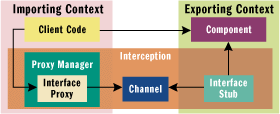 |
| Figure 1 COM Marshaling Architecture
|
Conceptually, the client code has direct access to the
component. But under the covers, two separate objects—the interface
proxy and stub—are loaded automatically by COM in the client and
component's contexts. If the contexts are in different processes or
on different machines, then COM provides a channel object that
transfers proxy and stub-initialized buffers over RPC. This channel
object is implemented over RPC, but conceptually it is accessible in
both the importing and exporting contexts. The proxy packages method
parameters into a buffer obtained from the channel, whereas the stub
obtains this buffer and uses it to construct the stack frame to call
the component.
COM loads
the interface proxy and stubs when the original interface pointer of
the component is first marshaled out of the component's context into
the client's context. In standard marshaling, COM passes the
interface pointer as a parameter to CoMarshalInterface. This
function takes the context-specific interface pointer and converts
it into a context-neutral blob of bytes that describes the precise
location of the component and the interface that's being marshaled.
This blob of data is unmarshaled in the client context, which
converts this context-neutral blob into a context-specific interface
proxy object, which is aggregated into the proxy manager (that also
provides the proxy object's identity).
The
significant thing about this architecture is that the proxy object
looks exactly like the original object. The interface stubs know the
interface intimately and behave just like an in-context client. The
component and its client do not know about marshaling or how it is
implemented. This happened because the proxy and stub objects
intercept the call to the component. COM marshaling merely
intercepts method calls and transmits them across contexts, but as
you can see, other interception code could contain code to optimize
calls across the network. I will describe how you can write this
kind of interception code and explain some code that Microsoft has
already provided for this purpose.
Specifying Data to Transfer Using
IDL
The
simplest way to generate interface proxy and stub objects is to
describe the interfaces in IDL and use MIDL to generate the code for
you. For an introduction to IDL arrays, I recommend "Understanding
Interface Definition Language: A Developer's Survival Guide," in
the August 1998 issue of MSJ. For a more complete description
read ActiveX®/COM
Q&A in the November 1996 issue of MSJ.
IDL is used to describe the amount of data transferred
during a call and the direction in which it is transferred (from the
client to the component or vice versa). The direction is indicated
by the [in] and [out] attributes, whereas the capacity (the maximum
size of the array) is indicated by [size_is()] or its equivalent,
[max_is()]. The actual number of data items is indicated by
[length_is()]. The [size_is()] attribute tells the proxy how much
data will be transferred to the stub, and the proxy uses this
information to determine how large a buffer it should request from
the channel and how many bytes to copy into this buffer. Sometimes
the array that will be transferred may not be completely filled, so
[length_is()] (or the equivalent, [last_is()]) can be used as an
optimization to reduce the number of unnecessary bytes transferred
from the client to the component.
Here are
some examples of how to use these attributes:
HRESULT PassLongs([in] ULONG ulNum,
                      [in, size_is(ulNum)] LONG* pArrIn);
HRESULT GetLongs([in] ULONG ulNum,
                      [out, size_is(ulNum)] LONG* pArrOut);
HRESULT GetLongsAlloc([out] ULONG* pNum,
                      [out, size_is(, *pNum)] LONG** ppArr);
| When passing data from the client to
a component, the client always allocates storage and is responsible
for the deallocation of that storage. In the previous examples, the
ulNum parameter is most likely an auto variable in the client code,
and pArrIn is a pointer to the first element in an array of at least
ulNum LONGs, which may be allocated on the stack or heap. Since the
[size_is()] attribute is used, it means that the marshaler will only
transfer ulNum items.
When
passing data from the component to the client, the client passes a
pointer to storage where the data will be copied by the marshaler.
So GetLongs can be called like this:
ULONG ulNum = 10;
LONG l[10];
hr = pArr->GetLongs(ulNum, l);
| The component code may look like
this:
STDMETHODIMP CArrays::GetLongs(ULONG ulNum, LONG *pArr)
{
   for (ULONG x = 0; x < ulNum; x++) pArr[x] = x;
   return S_OK;
}
| As you can see, the component code
assumes that the data storage is accessible through the pArr
pointer. The component-side marshaler will allocate sufficient
storage because the [size_is()] attribute tells it the required
size.
As I
mentioned earlier, it is the client's responsibility to deallocate
the storage. In this case, no extra code is needed because I have
used auto variables on the stack. This technique assumes that the
client knows how many items are available.
What
happens when the number of items cannot be determined by the client
before requesting the data from the component? Take a look at the
example shown earlier that contains GetLongsAlloc. Here, the
component returns the size of the returned array via the pNum
parameter. However, because this size is determined by the component
method, the marshaler will not have enough information to allocate
the storage before the method is called. Therefore, the component
must allocate this memory. It does this by using a memory allocator
that the marshaling layer knows about, CoTaskMemAlloc.
STDMETHODIMP CArrays::GetLongsAlloc(ULONG *pNum, LONG **ppArr)
{
   *pNum = 10;
   *ppArr = reinterpret_cast<LONG*>(CoTaskMemAlloc
                                    (*pNum * sizeof(LONG)));
   for (ULONG x = 0; x < *pNum; x++) (*ppArr)[x] = x;
   return S_OK;
}
| The memory
is not deallocated by the component, which at first may look like a
memory leak if the component and client are on different machines.
This is not the case. After the marshaling code on the component
side has transferred the data to the RPC, it will make the call to
CoTaskMemFree to release the component-side buffer. On the client
side, the marshaler will see that *pNum items have been sent and
will make another call to CoTaskMemAlloc for the client-side copy of
this array and copy the items into it. The client can then access
these items, but it must deallocate the array with a call to
CoTaskMemFree:
ULONG ulNum;
LONG* pl;
hr = pArr->GetLongsAlloc(&ulNum, &pl);
for (ULONG ul = 0; ul < ulNum; ul++) printf("%ld\n", pl[ul]);
CoTaskMemFree(pl);
| The number
of items and a pointer to the array are returned to the client from
GetLongsAlloc. This is why the address of pl is passed to the
method, and it is the reason why the IDL has the strange notation of
[out, size_is(, *pNum)] LONG** ppArr
| The comma in [size_is()] indicates
that *pNum is the size of the array pointed to by ppArr.
If you use any of the array attributes that I have
mentioned, you must produce a proxy-stub DLL by compiling and
linking the C files produced by MIDL. The ATL AppWizard produces a
make file called projectps.mk to do this. You must make sure
that your server does not register its component's interfaces as
type library marshaled with the automation marshaler because
automation does not recognize the array attributes.
Data Transfer with Type Library
Marshaling
What if
your clients use type library marshaling? You have two options. You
can use either a BSTR or a SAFEARRAY to transfer the data. A BSTR is
a length-prefixed buffer of OLECHAR (each one 16 bits), but you can
ask COM to create an array of 8-bit bytes instead by calling
SysAllocStringByteLen:
// pass NULL for the first parameter to
// get an uninitialized buffer
BSTR bstr = SysAllocStringByteLen(NULL, 10);
LPBYTE pv = reinterpret_cast<LPBYTE>(bstr);
for (UINT i = 0; i < 10; i++) pv[i] = i * i;
| MIDL will
generate marshaling code for BSTRs based on the fact that they are
length prefixed. To see this in action, add a BSTR to an interface
method and look at the project_p.c marshaling file generated
by MIDL. You will find that the BSTR is user-marshaled using the
functions BSTR_UserSize, BSTR_UserMarshal, BSTR_ UserUnmarshal, and
BSTR_UserFree, which are present in OLE32.dll.
These marshaling routines use the BSTR prefix to determine
how many bytes to transmit. They do not interpret the data as a
string, so the data may be binary data with embedded nulls. If the
data is in a BSTR, it would seem natural to use this when writing an
application in Visual Basic®. Although this is possible, Visual
Basic does a lot of work for you with BSTRs, and you have to undo
some of this work to get access to its data.
For
example, if you have this method:
HRESULT GetDataInBSTR([out, retval] BSTR* pBstr);
| You can access the binary data in
the BSTR using Visual Basic:
Dim obj As New DataTransferObject
Dim s As String
Dim a() As Byte
' get the BSTR
s = obj.GetDataInBSTR()
' convert it to a Byte array
a = s
' now do something with the data
For x = LBound(a) To UBound(a)
   Debug.Print a(x)
Next
| It takes
about as much code to do the same thing in C++ with ATL, which is
usually not the case for COM code.
CComPtr<IMyData> pObj;
pObj.CoCreateInstance(__uuidof(DataTransfer));
CComBSTR bstr;
// get the BSTR
pObj-> GetDataInBSTR(&bstr);
// get the number of bytes in the BSTR
UINT ui = SysStringByteLen(bstr.m_str);
LPBYTE pv = reinterpret_cast<LPBYTE>(bstr.m_str);
// do something with them
for (UINT idx = 0; idx < ui; idx++)
   printf("array[%d]=%d\n", idx, pv[idx]);
| Another
problem with putting binary data in a BSTR is that most wrapper
classes assume that the data is a Unicode string. I explicitly call
SysStringByteLen to get the number of bytes in the BSTR because
CComBSTR::Length will return the number of Unicode characters in the
BSTR.
Another way
to pass data is through a Visual Basic SAFEARRAY (for details about
SAFEARRAYs see the OLE
Q&A column in the June 1996 issue of MSJ). SAFEARRAYS
are self-describing; they contain a description of the type of the
items in the array, as well as the number of dimensions and the size
of each dimension. The combination of these pieces of information
allows the marshaler to know exactly how many bytes should be
transmitted. An added benefit of this technique is that if the
SAFEARRAY contains VARIANTs, then the data will be readable by
scripting clients. However, you will have to justify the overhead of
16 bytes for each VARIANT item to hold a single BYTE of data.
Transferring Data with Stream
Objects
The final
method of transferring data that I want to mention is the use of
stream objects. IStream pointers can be marshaled by type library
marshaling, and can be accessed by C++ clients. However, they are
not directly accessible through Visual Basic code. (Persistable
objects in Visual Basic do support IPersistStream and
IPersistStreamInit, but do not give direct access to IStream.) The
IStream interface effectively gives access to an unstructured buffer
of bytes. The code that writes data to the stream and the code that
reads the data must understand the format of the data put in the
stream, as shown in Figure 2.
The
advantage of using a stream to transfer data is that all machines
running Win32®-based operating systems will have stream marshaling
code. However, as Figure 2 shows, you do not get direct access
to the data in the stream through the IStream interface. If the
stream holds many data items, this will result in many calls to the
stream to access the data.
Improving Data Transfer Performance
Now that I
have explained the various ways to transfer data, let's take a more
detailed look at performance issues. Distributed applications are
great from the programmer's perspective because they allow you to
utilize the data and component functionality available on many
machines across the network. Windows DNA provides the platform and
tools to access these distributed components. However, from a
performance perspective distribution really stinks. It can take four
orders of magnitude as long to make a call across a machine boundary
than it does to make an in-context call (see the ActiveX/COM
Q&A column in the May 1997 issue of MSJ for more
details). For best performance you should keep the number of network
calls to a minimum, and avoid them completely whenever
possible.
It is not
always possible to avoid network calls, and in some cases you may be
making network calls when you don't even know it. This can happen
with distributed transactions in Microsoft Transaction Services
(MTS). MTS allows you to create a transaction on one machine and
enlist resource managers on other machines into the same
transaction. This is possible because the context object for an MTS
component holds information about the component's transaction
requirements (which are persisted in the MTS catalog) and details
about any existing transaction that the component is using. When
such an MTS component uses a resource manager through an inproc
resource dispenser, MTS checks the context object and if a
transaction exists, MTS tells the resource dispenser to enlist the
resource manager in the transaction. If your transactional MTS
component accesses another MTS component that has the Required
transaction attribute, then the transaction will be exported to the
new component.
MTS works
over normal DCOM, so there are separate packets of data passed over
the network to make the component activation requests and method
calls as well as the Microsoft Distributed Transaction Coordinator
messages to maintain the transaction. As a result, you can often
make a significant improvement to your MTS application's performance
by keeping transactions local and avoiding distributed transactions
altogether.
One of the
unsung improvements in COM+ is that it streamlines the use of
distributed transactions by hijacking the DCOM packets that are used
to access remote COM+ components. This makes COM+ a far better
platform for applications that require distributed transactions.
However, because COM+ uses DCOM packets to transfer the transaction
ID and MTS doesn't, the two do not interoperate. As a result, you
cannot use MTS-based components and COM+ components in the same
transaction.
Even with
this optimization, if a resource manager is involved with a
transaction created on and coordinated by another machine, there
will always be extra network calls to perform the two-phase commit.
Therefore, it makes sense to keep your transactions local whenever
possible.
If you must
access a component on a remote machine, first determine whether the
transaction must be created on the local machine and passed to the
remote component. If not, remove transaction support from your local
COM+ component.
Resource
managers are typically data sources like SQL Server™. In general,
components should be as close as possible to the data that they will
use, so usually the middle tier is on the same machine as the data
source it uses. If this is not possible, consider using a stored
procedure to manipulate the data in the data source. This way the
transaction can be created in the stored procedure and kept local to
the machine that uses it.
Buffer Sizes and Cross-machine
Calls
Keeping the
number of network calls small is important, but keeping the buffer
size as large as possible is equally important. This is partly just
common sense. The RPC and DCOM header information in a DCOM packet
accounts for about 250 bytes or so, and if you increase the size of
the buffers passed in each network call, you can ensure that most of
the DCOM packet will consist of data rather than the protocol's
overhead. Of course, if your buffers are large, it will almost
certainly mean that you have aggregated data into one call that
would otherwise have to be sent in multiple network calls.
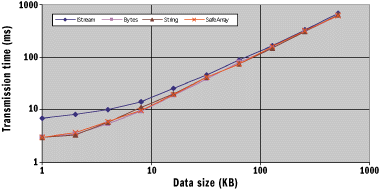 |
| Figure 3 Transmission Time versus Size
|
In Figure 3 I have plotted the results of my
tests to show how the transmission time of a data buffer varies with
the size of the buffer. I've used various common methods of passing
the data, which are described in Figure 4. The measurements were taken for
transferring the data between two machines running Windows 2000 on a
quiet network. I was careful to include the time taken to clean up
any buffers used by the client when the data was released. The
absolute values are not significant as you'll find different values
for your network and machine, but what is important are the trends.
As you can see, the lines nearly converge after the buffer size
reaches 8KB. In other words, beyond that point the efficiency of the
data transmission is the same regardless of the size of buffer.
Below this value, the data transmission efficiency is significantly
reduced as the buffer size decreases.
The other
striking discovery is that except when transferring data via a
stream object (which consistently takes longer than the other
methods), the transfer rates are effectively the same. This
indicates to me that Windows 2000 must be using similar—if not the
same—marshaling code to transfer BSTRs, SAFEARRAYs, and conformant
arrays. This is good news for programmers partial to Visual Basic.
It means that they don't have to be left out of the marshaling game
just because automation marshaling does not allow them to pass data
using a conformant array. Now they too can pass large buffers
efficiently between machines.
Marshaling Objects
So
how should you transfer data between processes in a distributed
application? As I've mentioned, the most important issue is to
design your interfaces to pass large data buffers in a few network
calls rather than making a large number of calls passing small
amounts of data.
The type of
property access you're used to in Visual Basic is possibly the worst
thing to do in a distributed application.
Dim day As New Day
day.Day = 8
day.Month = 9
day.Year = 2000
Debug.Print day.DayName
| If the Day object resides in another
context, then each call to the object will involve marshaling. In
this example, four calls are made to the object. They could easily
be reduced to one call by replacing the properties with a simple
method:
Dim day As New Day
Debug.Print day.GetDayName(8, 9, 2000)
| Accessing
the object in this way is familiar to MTS and COM+ developers. This
type of component is often called stateless because the state of the
component is passed in the method parameters. MTS and COM+
transactional components are accessed this way to keep the
transaction isolated; the component is activated just to execute
GetDayName.
Wherever
possible you should pass data by value and not by reference. Objects
are wonderful because they make code easier to read. A drawback of
COM components (as far as distributed data transfer is concerned) is
that they are always passed by reference. Thus, when you create a
component on a remote machine, it will always live on that
particular machine and all access to it will be via a marshaled
interface pointer. Thus method calls to the component will always
involve a network call.
When you
design your object model, you should avoid passing data using
components. For example, the following Visual Basic code is a bad
idea:
Dim person As New Person
' if this is in-context then property access is OK
person.ForeName = "Richard"
person.SurName = "Grimes"

Dim customers As CustomerList
Set customers = CreateObject("CustomerSvr.CustomerList", _
                             "MyRemoteServer")
customers.Add person
| In this case I am assuming that the
object named person is created in-context so that I can call it
using property access. This object is then passed to a remote
object: customers. The code is readable and logical. You are adding
a new person to a list of customers, so you create a new instance of
the Person class and add it to an instance of the CustomerList
class. However, this code is very bad for a distributed application
because the person object is not passed to the customers object
directly, but by reference. This means that the customers object
must make network calls to get the data from the person object. In
this simple example it would have been far better if the
CustomerList class had a method that could be passed the customer's
name rather than using an additional object.
Of course,
real-world code is rarely as simple as this. Passing objects has
true advantages, especially if the object has many data members.
Have you ever called a method with 10 parameters and gotten back
E_INVALIDARG, then spent tons of time trying to find out exactly
which parameter was invalid and why? This situation can be avoided
if you pass the data as properties to an in-context object. Then the
object can perform validation as each property is changed, which
allows the object to return a meaningful error code if the property
is invalid. To get the benefits of passing data via an object—but
without the inefficiency of cross-context access—implement the
object so it is marshaled by value.
Marshaling by Value
Marshaling by value has been discussed before in
MSJ, but I will give a brief overview because I want to talk
about marshaling in more depth later on. (For a good starting point
see House
of COM in the March 1999 issue of MSJ.) If a component
wants to have a say in the marshaling mechanism, it should implement
IMarshal. When COM creates a component, it will always query for
this interface. If the component does not implement IMarshal, it
means that it is happy with standard marshaling. If the component
implements IMarshal, then COM will call its methods to get the CLSID
of the proxy object used in the client context, as well as to obtain
the blob of data that contains information that will be passed to
the proxy to allow it to connect to the object.
In
marshal-by-value, a component indicates that it should always be
accessed in-context. This is achieved by persuading COM to create a
clone of the component in the client context. To do this the
component must be able to serialize its state and initialize a copy
of itself from this serialized state. When COM marshals the
component's interface, it asks for the CLSID of the proxy object.
The component can then return its own CLSID to force COM to create
an uninitialized version of the component in the client context.
When COM asks for the component to provide marshaling information
with a call to IMarshal::MarshalInterface, the component should
serialize its state to the marshaled packet. COM then passes this
packet to the proxy object (the uninitialized instance of the
component in the client context), which can then extract the
component state information and use this to initialize the clone.
The marshal-by-value mechanism basically freeze-dries the object,
copies it to the client context, and then rehydrates the component
there. The connection to the out-of-context object is no longer
needed because the proxy is an in-context version and all COM calls
are serviced by it.
Marshal-by-value is used more often that you may realize.
ActiveX Data Objects disconnected recordsets are one well-known
example of marshal-by-value. Standard error objects (created through
CreateErrorInfo and accessed through GetErrorInfo) are also
marshaled by value so that when your client code accesses the error
object to get information about the error, the call will not involve
marshaling. Note, however, that the extended error objects used by
OLE DB are not marshaled by value. Instead, they generate the error
description at the time the client calls IErrorInfo::GetDescription
using an additional object, called a lookup object, that runs in the
context of the object that generated the error. This requires a
marshaled call.
You should
note that marshal-by-value components impose one restriction. If the
connection to the out-of-context component is lost, the proxy cannot
write values to that component, and the proxy that the client
receives will be read-only.
Handler Marshaling
Handler marshaling is described in the COM specification as
being the middle ground between standard and custom marshaling. That
is, the developer hooks into the standard marshaling mechanism to
provide extra code, but essentially keeps the ar-chitecture intact.
Handler
marshaling is not new. It first appeared as part of OLE 2, where it
was used for embedded objects in compound documents. One of the
problems of OLE 2 was that when you had more than one OLE server
loaded, the whole system would grind to a halt because of the amount
of memory consumed. Inproc handlers alleviated this problem because
they could implement some of the object's interface ººmethods (for
example, rendering) that could be performed by inproc code. If the
client requested an action that the handler could not perform, then
the handler could load the server to get it to do the work.
One form of handler marshaling can be implemented on
versions of Windows before Windows 2000. The component can implement
IMarshal to indicate that a custom proxy object, called a handler,
should be used in place of the standard marshaling object. When COM
asks the component for a marshal packet by calling
IMarshal::MarshalInterface, it obtains a standard marshal packet by
calling CoGetStandardMarshal. This means that the object's
interfaces will be marshaled using standard marshaling, so the
developer does not have to worry about writing interprocess
communication code. The main reason for the component to implement
IMarshal is so that it can use GetUnmarshalClass to return the CLSID
of the handler object. However, the component and handler can take
advantage of the fact that IMarshal is being used and can append
extra initialization data to the marshal packet.
Since the component's interfaces use standard marshaling,
the handler can have access to the out-of-context object, but it can
also handle some of the object's interface methods locally.
Therefore, an enumerator could implement the Next method to return
values from a cache, and replenish this cache using calls to the
actual object requesting a large number of items. However, if the
sole purpose of implementing IMarshal is to indicate the CLSID of
the custom proxy that will be used, it may be unnecessary to
implement all of the methods of IMarshal in the object.
COM provides an alternative in which the object need not
implement IMarshal. Instead, it implements an interface called
IStdMarshalInfo as shown in the following code, where a single
method called GetClassForHandler is the equivalent of
GetUnmarshalClass.
 [   local, object,
    uuid(00000018-0000-0000-C000-000000000046) ]
interface IStdMarshalInfo : IUnknown
{
    HRESULT GetClassForHandler([in] DWORD dwDestContext,
        [in, unique] void *pvDestContext, [out] CLSID *pClsid);
}
| COM will look for this CLSID under
the CLSID registry key, where it expects to find an InProcHandler32
key with the path to the server that implements the handler.
Handler
marshaling in Windows 2000 allows you to hook into the marshaling
process on the client side. You can use this to restrict the number
of calls to the component by allowing the handler to judge whether a
marshaled call is necessary. The handler should implement the
interfaces of the component that it allows the client to call. If
the client queries for an interface that is not implemented by the
handler, then the call will fail.
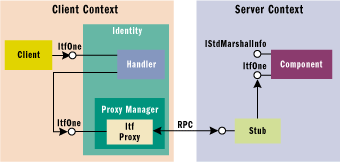 |
| Figure 5 Handler Marshaling Architecture
|
Figure 5 shows the client-side
architecture. As you can see, the handler is aggregated by a
client-side identity object that implements IUnknown. The handler
can choose to implement an interface in its entirety or it may
decide to delegate the client call to the actual object. In the
latter case, the handler should obtain a pointer to the proxy
manager and use that pointer to get access to the object's
interfaces. To do this, the handler calls:
HRESULT CoGetStdMarshalEx(IUnknown* pUnkOuter,DWORD dwSMEXFlags,
                          IUnknown** ppUnkInner);
| The first
parameter is the controlling IUnknown of the handler—the identity
object. The second parameter is a flag that is used to specify
whether the proxy manager or server-side standard marshaler is
required; a handler passes a value of SMEXF_HANDLER. If the call is
successful, a pointer to the proxy manager is returned in the final
parameter. The handler can then query this pointer for the interface
that it requires, and it will be returned a pointer to a standard
interface proxy. Since this is a hook into standard marshaling, the
interfaces can be custom or dual interfaces.
Figure 6 shows a handler for an interface
that gives access to an array of strings which are the names of the
files in a folder. This code comes from the FileEnum example that
can be downloaded from the link at the top of this article.
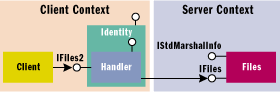 |
| Figure 7 Objects Used in FileEnum
|
Figure 7 shows the objects used
in this example. The client context is implemented with the
following code:
Interface IFiles2 : IDispatch
{
    HRESULT GetNextFile ([ out, retval] BSTR: pData);
};
| while the server context corresponds
to this snippet:
interface IFiles : IUnknown
{
    HRESULT GetNextFiles ([ in] ULONG count,
        [out, size_is(count), length_is(*pFetched)]
        BSTR* pData, {out} ULONG* pFetched);
};
| Notice that the handler and the
component implement two different interfaces. The handler implements
IFiles2, which has a single method called GetNextFile. This returns
the next file name in the list of file names that the component
maintains for a specified folder. The component implements the
IFiles interface which has been optimized for the network, and
allows many file names to be obtained through the GetNextFiles
method. IFiles is marshaled with a proxy-stub DLL because it uses
[size_is()] and [length_is()]. IFiles2 is accessed in-context,
therefore it is not marshaled.
IFiles::GetNextFile works by maintaining a cache locally,
and when this cache is empty it calls through to the Files object to
get BUF_SIZE number of items. One irritating feature of this scheme
is that the handler is created in the client context but isn't
initialized. So once the client has activated the handler in its
context, an out-of-context call must be made on the first client
access.
A more
efficient scheme would be to pass some initialization values to the
handler. Handler marshaling in Windows 2000 allows you to do this,
but both the object and the handler must implement IMarshal. The
object must provide an implementation of all methods except
IMarshal::UnmarshalInterface because this is the only method that
the handler must implement. The object can use
IMarshal::MarshalInterface to get access to the marshal packet and
insert its own data, similar to marshaling by value, with the size
of this data specified when COM calls IMarshal::GetMarshalSizeMax.
But how does the object get access to the marshal packet? Again,
this requires a call to CoGetStdMarshalEx:
CComPtr<IMarshal> m_pMarshal;
CComPtr<IUnknown> m_pUnk;

HRESULT FinalConstruct()
{
   HRESULT hr;
   hr = CoGetStdMarshalEx(GetUnknown(), SMEXF_SERVER, &m_pUnk);
   if (FAILED(hr)) return hr;
   hr = m_pUnk->QueryInterface(&m_pMarshal);
   if (SUCCEEDED(hr)) Release();
   return hr;
}
| This code passes the object's
IUnknown interface as the controlling unknown to CoGetStdMarshalEx
and passes SMEXF_ SERVER as the dwSMEXFlags parameter. This standard
marshaler object will AddRef this pointer. Since this represents an
excessive reference, the calling code calls Release to take this
into account. Next, the code queries for IMarshal. Notice that both
the IMarshal and IUnknown pointers have to be cached. If you release
the IUnknown pointer at the end of FinalConstruct, the IMarshal
interface will become invalid.
After this,
the IMarshal pointer can be used to implement IMarshal on the
object, as shown in Figure 8. Here I assume that the data you
want to marshal to the handler is in a buffer called ExtraData,
which is DATA_SIZE in bytes. Notice that GetUnmarshalClass is
implemented by the standard marshaler. This means that whatever
interface marshaler the standard marshaler thinks is used for
marshaling will be used for cross-context calls. Your interfaces can
be marshaled in any way, including type library marshaling, so your
clients can be scripting clients.
On the
client side, at the minimum your code should implement just
IMarshal::UnmarshalInterface, as shown in Figure 9. The other methods will not be
called unless an attempt is made to marshal the proxy pointer to
another context. (To handle this situation, just delegate these
methods to the standard marshaler. Since the handler has already
been specified, the standard marshaler will load it in the new
context.)
The
aggregated standard marshaler (returned from CoGetStdMarshalEx) is
available only on Windows 2000, so the handler will not run on any
other operating system. However, if your object implements
IStdMarshalInfo, the information about the handler will be passed
back to the client machine even if it is not running Windows 2000,
but it will result in a failure code. Since you cannot turn off
handler marshaling, both your clients and servers have to run on
Windows 2000.
Passing Data with Pipes
Imagine the case where you have megabytes or even gigabytes
of data to transfer. Your data packets will be much larger than 8KB
so you won't have to worry about inefficient calls to the network,
but there are other issues to keep in mind. Consider making a call
and processing the results. First, the client calls the component
and asks for data to be returned. The component will have to obtain
that data from somewhere and copy it into the buffer that RPC
transfers. RPC transfers the data across the network and copies it
into a buffer in the client context. Once it has been copied into
the buffer, the client can access the data. During this time, the
client thread will be blocked.
At this
point the client thread can process the data, but remember it's a
huge amount of data, so this will take a long time. During this
processing time the component is effectively idle—as far as the
client is concerned. Clearly, it takes a long time to generate the
data and transfer it, while the client waits around.
COM pipes were developed to reduce this waiting time. The
idea behind them is that the data buffer to be transferred should be
split into chunks and transferred one after the other down the pipe.
Instead of the client waiting a long time to get the entire buffer,
it just waits a shorter time for the smaller chunk to arrive. Once
the client gets the buffer, it can start to process it. COM now
requests another chunck of data to be sent from the component even
though the client hasn't yet requested it. This process of
requesting a chunk of data while another is being processed is
called read-ahead.
If you get
the balance right, the time taken to process a chunk will be the
same as the time taken to generate and transfer another chunk. This
means the client will get immediate access to the next chunk of data
without any waiting time. Of course, this balance is not easy to
attain, but the savings can be significant.
Pipes are
not a new technology; Microsoft RPC has supported them for a while.
The difference is that in RPC you had to define the data that would
be transferred via the pipe, and because RPC is not object based,
you had to deal with context handles. The Windows 2000 Platform SDK
defines three pipe interfaces: IPipeByte, IPipeLong, and IPipeDouble
(see Figure 10). Every machine running Windows
2000 has the marshalers for each. These interfaces differ only in
the type of data that they transfer.
Each pipe
interface has two methods: Push and Pull, which means that COM pipes
are bidirectional. Once one executable has a pipe from another, it
can both receive (pull) and transmit (push) data. Indeed, it can do
both at the same time! Notice that these interfaces are declared
with the async_iid attribute so you can call them synchronously or
asynchronously (non-blocking). I will come back to this issue in a
moment.
When you
use pipes, the first decision you have to make is which part of your
application will implement the pipe code, the client or the
component. Consider these two methods:
HRESULT ProvidePipe([in] IPipeByte* pPipe);
HRESULT GetPipe([out] IPipeByte** ppByte);
| The first method is designed to be
called by a client that has an implementation of the IPipeByte
interface. It creates an instance of this and passes it to the
component, which can then initiate the calls to pull or push data.
With the second method, the component gives access to an
implementation of the pipe in the server context, in which case it
is the client, not the component, that initiates the pull or push
operation.
Pulling and
pushing data is very straightforward. Your code does not have to be
concerned with the read-ahead feature because this is carried out by
the pipe marshaler provided by Windows 2000. However, there is one
issue you need to address: how does COM know that there is enough
data available to perform read-ahead? A pull operation means that
the pulling code must repeatedly call IPipeXXX::Pull, and while it
is processing each buffer COM will call the component to get the
next buffer. Clearly COM must be told when the data is exhausted so
that it should not do any more read-ahead. To do this, the pipe
implementation must return 0 in the pcReturned parameter. As a
result, there will always be one more network call than is necessary
when using Pull.
Figure 11 shows a simple pipe implementation
for transferring text files via a pipe. This component just
implements the Pull method, which is called repeatedly until it
indicates that zero bytes were returned. The pipe will return this
value when there is no more data in the file. This pipe can be
returned by the GetFileData method shown in Figure 12.
The Push
method is just as simple. Push is called repeatedly until it has no
more data to send. However, so that COM knows that the data is
exhausted and that it cannot perform read-ahead, the data pusher
must send zero bytes, as shown in Figure 13.
The actual
data transfer is carried out by the pipe, so it is important to make
sure that the pipe is notified when it is no longer needed. If you
forget to call Push and pass zero bytes, or implement the Pull so
that it returns zero bytes when the transfer is complete, the pipe
will still be active and COM will still have a reference on it. You
will see this if you try to shut down the apartment that has the
pipe proxy—the call to CoUninitialize will hang until COM times out
the call (if the call goes across machine boundaries).
What about the size of the buffer transferred via each call
to the pipe? You have two criteria to take into account. The first
is the efficiency of the network. You should perform basic timing
tests on the target network under typical conditions to see what
packet size is most efficient. (My network, as shown in the results
given in Figure 3, is efficient for
8KB data packets or larger.) The other criteria is the processing
that is performed on the data by the code receiving the data. The
ideal case is when the processing of each buffer takes the same
amount of time as it takes to generate and transfer the buffer. In
that case when one buffer has been processed, COM will have received
the next buffer and it will be available for processing.
The only way you can determine the best buffer size is to
test the code on the target network. Figure 14 shows a simple class and code to
perform such testing, but remember Heisenberg's uncertainty
principle—the measurement on a system will affect the system (in
this case, the timings will include the time used to take the
timings). But from this class you can get an idea of the maximum
time that the data processing should take. You should test the data
transfer for various sizes of buffers.
The next
step in the test is to use static data in the client (in other
words, do not transfer any data) to test how long the data
processing takes. Again, run this test using various sizes of
buffers. Finally, compare the two sets of figures and choose the
buffer size that best matches the processing time to data transfer
time. The download for this article includes a project that allows
you to read and write file contents over pipes.
Asynchronous Pipes
What about the asynchronous versions of the pipe
interfaces? Although pipe read-ahead allows you to synchronize the
data transfer and processing, it's possible that the client thread
will be blocked while a data buffer is being transferred. To get
around this, you can call the pipe using the non-blocking version of
the pipe interface. The pipe implementor can utilize the
non-blocking mechanism to implement the pipe using a custom thread
pool rather than the RPC thread pool to run the pipe code. This
allows the pipe implementor to manage threads more
efficiently.
When
pulling data via the non-blocking versions of the pipe interfaces,
the caller thread initiates the transfer by calling the Begin_Pull
method, indicating how many items are required. It can then perform
some other processing and return later to obtain the data (and the
number of items returned) by calling the Finish_Pull method. During
this time COM will have received the data and cached it ready for
collection. When Finish_Pull is called, COM will perform the
read-ahead to get the next buffer. Take a look at the non-blocking
version of this method:
HRESULT Begin_Pull([in] ULONG cRequest);
HRESULT Finish_Pull([out, size_is(*pcReturned)] BYTE* buf,
                  [out] ULONG* pcReturned);
| This is
pseudo-IDL because the actual methods are generated by MIDL. On
initial inspection it appears odd because when you call Finish_Pull
you pass the buffer you want filled, after the actual transfer has
been performed. Presumably COM will have read the data into some
private buffer, and when you call Finish_Pull, it copies the data
from this buffer into your buffer.
The
non-blocking version of Push is useful for sending data to another
process without the current thread blocking, which is quite useful,
especially if the amount of data is large. Since there are no [out]
parameters on Push, you should call Push_Finish to allow COM to
clean up any resources it may have used and to determine if the push
was successful. (The return value from Push_Begin only indicates
that the method call was accepted by COM.)
To use
pipes you must have the headers and libraries from the most recent
Platform SDK, and you must define _WIN32_WINNT to have a value of
0x500 in your stdafx.h.
Wrap-up
Data
transfer over COM requires careful thought about the best method for
moving the data across the wire. In general, you should make as few
network calls as possible. When you do make a call, you should make
the transmitted data buffers as large as you can, and always avoid
the kind of property access used in Visual Basic.
To
further facilitate data transfer, COM gives you several tools.
First, to avoid the problems with method calls that have many
parameters, you can pass the data in an object as long as the object
is marshaled by value. This allows you to combine the benefits of
validation that an object provides, with the efficiency of network
calls when data is passed by value. Next, Windows 2000 allows you to
create lightweight client handlers that can make smart decisions
about whether to make calls to an out-of-context component. Such a
handler can cache results and make buffered reads and
writes.
Finally,
Windows 2000 provides pipe interfaces that allow you to transfer
large amounts of data over the network efficiently. This works by
splitting up your data into sizable chunks, allowing COM to handle
the transfer of these chunks over the pipe.
|
 read user
comments
read user
comments .gif)


 Back to
top
Back to
top post new
comment
post new
comment