|
Business continuity planning (BCP) demands a certain level of skill,
expertise and experience that may be lacking in an enterprise. Using an
outside consultant for the writing, testing and implementation stages may
be an expensive option. On the other hand, a "do-it-yourself" approach
could prove complicated and time-consuming — especially when multiple
organizations and sites are involved. A software-based planning tool can
be used as part of the solution.
Since 1990, a number of BCP software packages have emerged, often as an
adjunct to a vendor’s consulting services, to assist site personnel in
creating a plan that coordinates all business continuity activities.
However, no package is a panacea — BCP requires a considerable effort from
personnel throughout the enterprise, and also a specialized planning
operation. The separate plans that make up BCP include:
- A disaster recovery plan, to recover mission-critical technology and
applications at an alternate site
- A business resumption plan, to continue mission-critical functions
at the production site through workarounds until the application is
restored
- A business recovery plan, to recover mission-critical business
processes at an alternate site (sometimes this is called “workspace
recovery”)
- A contingency plan, to manage an external event that has a
far-reaching impact on the enterprise.
BCP tools may be employed for the creation and maintenance of all of
these plans; the disaster recovery plan is the most complex because of the
technical details involved. Tools range in complexity from electronic
fill-in-the-blanks forms to client/server and Web applications that let an
enterprise maintain the plan on an ODBC database, complete with granular
access controls and audit trails for change tracking. Most products run
with Microsoft Windows.
- Features: Most BCP packages offer a methodology — i.e., a
theory or procedure for determining priorities, risks and strategies.
Most products enable the attachment of Microsoft Word and Visio
documents, which is useful for call or vendor lists kept in Word tables,
or process flows kept in Visio. In addition, most packages offer a model
plan as a sample — but only as a sample, since no single business
continuity plan will work for all enterprises. Enterprises may alter the
terminology in the planning tool and the sample to mirror their
technologies and corporate cultures.
- Scope: Some tools are comprehensive in scope, while others
focus on specific aspects of the plan. While some vendors integrate
business impact analysis (BIA), others offer separate BIA tools that can
export data to other BCP tools. With the less-sophisticated tools,
creating, updating, printing and distributing the business continuity
plan is left to the enterprise. High-end tools offer flexible publishing
that can include printing a full “business continuity plan manual” and
separate plans for each recovery team. Plans may be created in HTML or
PDF formats for distribution to Web servers to allow access via an
enterprise's intranet or the Internet.
- Cost: Typically, the price — which varies considerably, often
related to the number of users — reflects the technical complexity of
the software and not necessarily the quality of the BCP expertise which
the software encapsulates. However, those extra dollars buy more than
extra "bells and whistles" — the high-end tools offer a solution,
not just a plan, that facilitates collaboration, flexible reporting and
publishing, and other benefits. The selection of a BCP tool must be
based on an enterprise's size, complexity, budget and work environment.
It's sensible to look for a tool that has (or can be customized to have)
a similar “look and feel” to other software at the site. In general,
licenses range from less than $10,000 for a single-user tool to $25,000
for LANs to approximately $100,000 for an enterprise.
Vendors and Products
Comdisco and SunGard have been stalwarts of the business
continuity/disaster recovery industry for more than 15 years. In addition
to software packages to assist in planning, they offer a full range of
services, including recovery centers, offsite backup and storage, and
consulting. Strohl Systems Group, a provider of consulting and education
services, has also been a pioneer in BCP software. Some simple
questionnaire-based products are on the market, often as freeware;
however, since these would not be the choice for a complex enterprise,
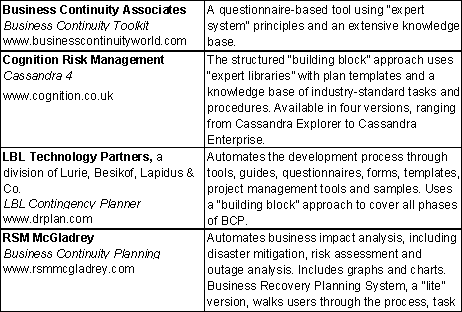
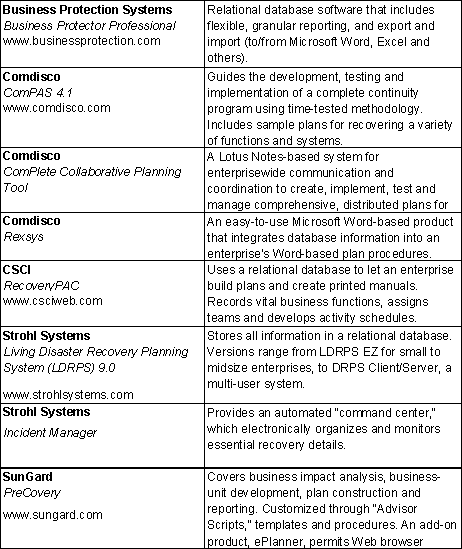
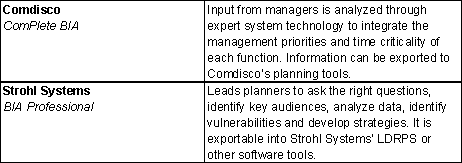
here we focus on technically more-sophisticated products (see Figure 1,
Figure 2 and Figure 3).
Figure 1
Business Continuity Plan Builders |