
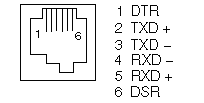
The PC-compatible DB9 connector pinout follows:
 The BC16E-nn (where -nn indicates the cable length) cable key
implicitly "flips over" (crosses-over) the signal wires, so
all DECconnect MMJ connectors are wired the same.
The BC16E-nn (where -nn indicates the cable length) cable key
implicitly "flips over" (crosses-over) the signal wires, so
all DECconnect MMJ connectors are wired the same.
The BC16-E-nn cross-over wiring looks like this:
| Terminal MMJ | Host MMJ | |
|---|---|---|
| DTR 1 | --->-------->--- | 6 DSR |
| TXD 2 | --->-------->--- | 5 RXD |
| 3 | ---------------- | 4 |
| 4 | ---------------- | 3 |
| RXD 5 | ---<--------<--- | 2 TXD |
| DSR 6 | ---<--------<--- | 1 DTR |
| MMJ | RJ45 | |
|---|---|---|
| 1 | --------- | 8 |
| 2 | --------- | 2 |
| 3 | --------- | 1 |
| 4 | --------- | 3 |
| 5 | --------- | 6 |
| 6 | --------- | 7 |
The BN24J looks like this:
| MMJ | RJ45 | |
|---|---|---|
| 1 | --------- | 7 |
| 2 | --------- | 6 |
| 3 | --------- | 3 |
| 4 | --------- | 1 |
| 5 | --------- | 2 |
| 6 | --------- | 8 |
   http://www.partner.digital.com:9003/public/cheat_sheets/cables/padapters.html
   http://www.airborn.com.au/rs232.html
For adapters and connectors, see WIRES2.
					[Stephen Hoffman]
                                        [Mike Thompson]
More recent Compaq (Compaq or DIGITAL logo) systems will use either the DECconnect MMJ wiring or (on all recent system designs) the PC-compatible DB9 pinout.
DECconnect MMJ adapters:
| Part: | Converts BC16E MMJ male to fit into: |
|---|---|
| H8571-C | 25 pin DSUB Female to MMJ, Unfiltered |
| H8571-D | EIA232 25 pin male (modem-wired) |
| H8571-E | 25 pin DSUB Female to MMJ, Filtered |
| H8571-J | PC/AT 9 pin male (PC serial port) |
| H8572-0 | BC16E MMJ double-female (MMJ extender) |
| H8575-A | EIA232 25 pin female (common) |
| H8575-B | EIA232 9 pin male (MicroVAX II console) |
| H8575-D | 25 Pin to MMJ W/EOS and ESD Protection |
| H8577-AA | 6 pin Female MMJ to 8 pin MJ |
| BC16E-** | MMJ cable, available in various lengths |
The H8571-A and H8575-A are MMJ to DB25 (female).
Also see:
http://www.openvms.compaq.com/wizard/padapters.html
For wiring and pinouts, see WIRES1
Jameco offers a USB-A to PS/2 Mini DIN 6 Adapter (as part 168751), for those folks wishing to (try to) use PS/2 Keyboards via USB-A connections.
					[Stephen Hoffman]
                                        [Eric Dittman]
In ASCII, XON is the [CTRL/Q] character, and XOFF is the [CTRL/S].
XON/XOFF flow control is typically associated with asynchronous serial line communications. XON/XOFF is an in-band flow control, meaning that the flow control is mixed in with the data.
CTS/RTS is another type of flow control, and is sometimes called hardware flow control. Out-of-band means that seperate lines/pins from the data lines (pins) are used to carry the CTS/RTS signals.
Both kinds of flow control are triggered when a threshold is reached in the incoming buffer. The flow control is suppose to reach the transmitter in time to have it stop transmitting before the receiver buffer is full and data is lost. Later, after a sufficient amount of the receiver's buffer is freed up, the resume flow control signal is sent to get the transmitter going again.
DECnet Phase IV on OpenVMS VAX supports the use of asynchronous serial communications as a network line. The communication devices (eg. modems, and drivers) must not be configured for XON/XOFF flow control. The incidence of these (unexpected) in-band characters will corrupt data packets. Further, the serial line device drivers might normally remove the XON and XOFF characters from the stream for terminal applications, but DECnet configures the driver to pass all characters through and requires that all characters be permitted. (The communication devices must pass through not only the XON and XOFF characters, they must pass all characters including the 8-bit characters. If data compression is happening, it must reproduce the source stream exactly. No addition or elimination of null characters, and full data transparency.
An Ethernet network is rather different than an asynchronous serial line. Ethernet specifies the control of data flow on a shared segment using CSMA/CD (Carrier Sense Multiple Access, with Collision Detect) An Ethernet station that is ready to transmit listens for a clear channel (Carrier Sense). When the channel is clear, the station begins to transmit by asserting a carrier and encoding the packet appropriately. The station concurrently listens to its own signal, to permit the station to detect if another station began to transmit at the same time - this is called collision detection. (The collision corrupts the signal in a way that can reliably be detected.) Upon detecting the collision, both stations will stop transmitting, and will back off and try again a little later. (You can see a log of this activity in the DECnet NCP network counters.)
DECnet provides its own flow control, above and beyond the flow control of the physical layer (if any). The end nodes handshake at the beginning to establish a transmit window size - and a transmitter will only send that much data before stopping and waiting for an acknowledgement. The acknowledgement is only sent when the receiver has confirmed the packet is valid. (A well-configured DECnet generally avoids triggering any underlying (out-of-band) flow control mechanism.)
[David Rabahy]
| Top | Back |